
CAIRNS 07 4053 6400 | info@cardzilla.com.au
TOWNSVILLE 07 4775 1399 | townsville@cardzilla.com.au
TRINITY PRINTERS 07 4031 5739 | sales@trinityprinters.com.au

PRINT ARTWORK GUIDELINES
Supplying your own artwork for print....
Requirements
We accept a range of formats for print but we prefer a PDF format, in CMYK colour, with a minimum of 300dpi resolution and with fonts converted to outlines or flattened.
Why?
Images that have a lower resolution may print pixelated or fuzzy. Those taken from the internet (including AI) often have a resolution of only 72dpi and will very rarely print well.
Digital printing uses a CMYK colour format (Cyan, Magenta, Yellow and Black). The colours on your screen are RGB colours (Red, Green, Blue). Some RGB colours that appear on your screen may appear differently printed in CMYK and give you a result you did not expect.
Very common fonts such as “Arial” and “Times New Roman” rarely have issues, however less common fonts risk not displaying correctly when printed unless they are "outlined" or "flattened" into a graphic.
Designed By Cardzilla
CARDZILLA has a creative team of designers that can convert your ideas into a practical design, give us a call.
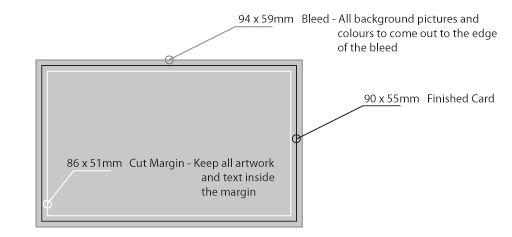
Artwork Bleeds – IMPORTANT!
Artwork printed commercially is generally trimmed down to the finished size. The artwork trimmed off is called ‘bleed’ and is there to ensure the design goes to the edge of the paper.
As an example, a business card would have a finished size of 90x55mm. The artwork size for that flyer would be 94x59mm, 4mm larger, giving 2mm extra on each side to be trimmed off.
It is wise to leave a margin from the edge with no critical detail in it such as text. We suggest this margin should also be 2mm and we call this a cut margin or safety margin.
Supplying AI-Generated Artwork
We love seeing your ideas, and AI tools are a great way to explore them. Before you send through AI-generated artwork, here are a few things worth knowing so we can get the best possible result for your print job.
Why AI files can be tricky for print
- Low resolution: AI images often look sharp on screen but come out blurry when printed. Print needs high-resolution files (usually 300 DPI or more), and most AI output falls short.
- No easy edits: AI usually delivers a flat image, not an editable file. That means name changes, new phone numbers, or small tweaks often require recreating the artwork from scratch, which adds time and cost.
- Logos that won't scale: An AI logo may suit a business card, but it can turn rough and pixelated on signage, banners, or vehicle wraps. Professional vector logos stay crisp at any size.
- Ownership and copyright: Depending on the tool, AI-generated designs may not legally belong to you. In some cases, they carry no copyright protection, which can leave your brand exposed. See the Australian Government’s IP Australia page on what to consider when using AI to create IP.
Can I use Canva?
Canva files are more workable than AI files for print. If you export as a PDF with the crop and bleed options ticked, our designers can usually edit it and prepare it properly. AI-generated files rarely give us that flexibility.
How to get the best result
AI output is genuinely welcome as inspiration or direction. Send it through to show us the look, colours, or layout you're after, and our designers will take it from there.
For print-ready quality, our team builds your artwork using professional tools like Adobe Illustrator and InDesign. That means high-resolution files, fully editable designs, scalable logos, and work you truly own.
Have an AI concept you love? Share it with us as a starting point, and we'll turn it into something built to print beautifully.
Artwork Guidelines Shortcuts
Below are a list of printable guidelines for a variety of print products.